

A three-page approval communication can answer more than "is this seat R129?" It identifies the approved model, manufacturer, restraint modes, size ranges, technical service, test-report reference and product marking. These are the fields an importer should match before approving labels, samples or a bulk order.
A supplier can put "R129" in a quotation with one keystroke. The approval communication is harder to compress into a sales phrase. It forces the conversation onto a specific model, manufacturer, approved use range and underlying test-report reference.
That distinction matters most when the offered seat has several orientations or restraint modes, or when the buyer wants a private-label version. The question is not whether the factory owns an R129 document somewhere. The question is whether the document, product, marking and sales claim refer to the same approved type.
From our side of the table, the cleanest enquiry names the destination market and intended model, then asks for the approval communication before label artwork begins. It is cheaper to find a mismatch in a PDF than after a branded sample has been photographed and approved.
1. Do not call every compliance PDF a certificate
Buyers often use "certificate" as a general name for several different records. For a useful review, separate them.
Approval communication
Records whether approval was granted, extended, refused or withdrawn. It identifies the approved type, manufacturer, scope, marking and the report used by the approval authority.
Technical service report
Contains the test work referenced by the approval communication. The report has its own date and number. The three-page communication and the complete report are separate records.
Approval label
Shows the approval mark on the physical product. Its code, category and size range must correspond to the approval document and to the configuration in the sample.
For example, the public BW25 approval communication is three pages. Field 11 names test report CS108-24-TAC, but that number does not turn the three-page communication into the full technical service report. Ask which document you are receiving and record its file name, revision and page count.
2. Start with the approval decision and full number
The top of the document presents several possible decisions. Read the selected status instead of assuming every uploaded PDF records an approval grant.
| Document field | BW25 example | BW15 example | Buyer action |
|---|---|---|---|
| Decision shown | Approval granted | Approval extended | Do not treat "granted" and "extended" as interchangeable document histories |
| Full approval number | E8*129R03/09*14928*00 | E8*129R03/08*13652*01 | Copy every segment, including the final extension sequence |
| Regulation printed on mark | UN Regulation No. 129/03 | UN Regulation No. 129/03 | Check the document applicable to the quoted product and current market requirements |
Do not shorten the number to "E8 R129" in your inspection record. That short form loses the series, approval identity and extension. A spreadsheet should store the full number as text so software does not strip characters or leading zeroes.
The UNECE UN Regulations index is the official entry point for the regulations, revisions and amendments under the 1958 Agreement. Use the current text and the requirements of the destination market when making a compliance decision. This guide explains document matching; it is not a market-access opinion.
3. Match the factory model, legal manufacturer and address
Field 3 is the manufacturer's designation of the Enhanced Child Restraint System. On the two Bewell files, it is BW25 and BW15. This field is more useful than a product nickname because it ties the approval to the manufacturer's model identity.
Fields 4 and 6 identify the legal manufacturer and address. Both examined files name Ningbo Bewell Baby Products Manufacturing Company., Ltd. and give the Hengjie Town, Haishu District, Ningbo address. Spelling and punctuation vary slightly between the two PDFs, but the company and location are identifiable.
If the supplier's quotation uses a different company, factory or model code, ask for the documented relationship before rejecting or accepting the file. A trading company may quote an approved manufacturer's product; a platform may also be sold under an approved trade name. The explanation still needs to connect the quoted SKU to the approval holder and model designation.
Identity check to place in the sourcing file
- Quoted supplier
- Legal company name shown on the commercial quotation
- Actual manufacturer
- Field 4 of the approval communication
- Factory address
- Field 6 of the approval communication
- Factory model
- Field 3 rather than the buyer's retail SKU alone
- Buyer brand
- Proposed trade name and the supplier's explanation of how it is covered
4. Read the approved modes, not one headline range
A single "40 to 150 cm" line hides the most important configuration changes inside the range. BW25 demonstrates why the orientation and restraint fields have to be read together.
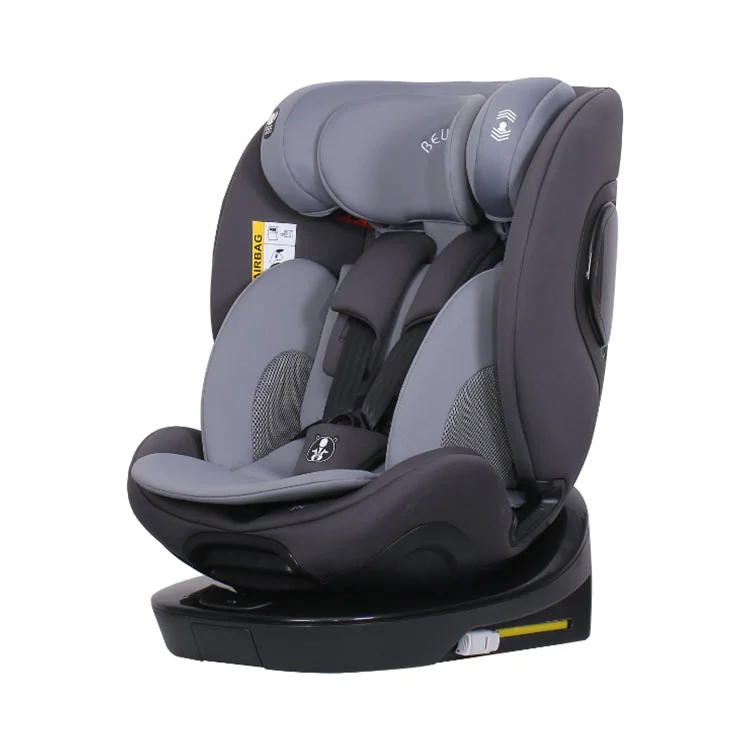
BW25 approval scope
Field 1 records forward-facing use at 76 to 150 cm, rearward-facing use at 40 to 105 cm, integral restraint at 40 to 105 cm and non-integral restraint at 100 to 150 cm. Field 12 grants 40 to 105 cm i-Size universal ISOFIX and 100 to 150 cm i-Size booster use.
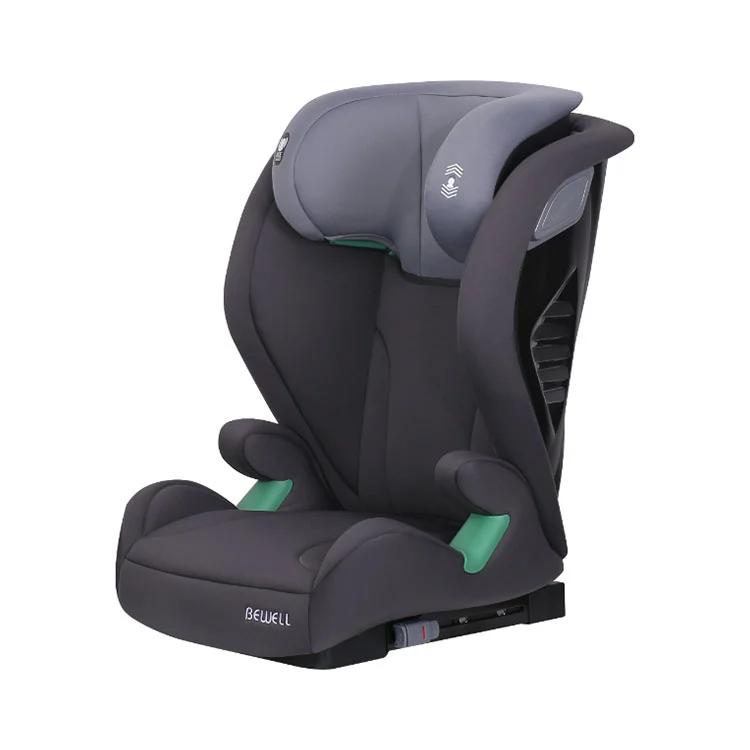
BW15 approval scope
Field 1 records forward-facing, non-integral use at 100 to 150 cm. Field 12 identifies the product as a 100 to 150 cm i-Size booster seat. It does not carry the earlier integral or rearward-facing modes shown in the BW25 document.
For an importer, this changes the product-page claim, label, manual and comparison table. It also changes the sample inspection. The inspector should test and photograph the exact adjustment and installation states covered by the proposed retail claim instead of signing off a seat under one broad height range.
Our working rule: build a mode matrix before building marketing copy. Put orientation, integral or non-integral restraint, approved height range, category and installation in separate columns. If a row cannot be traced to the approval communication and current instructions, stop the claim at the document boundary.
5. Check the trade-name field before private-label artwork
Field 2 on both examined files is a long list titled "Trade name or mark." It includes Bewell and many additional marks. Field 3 still identifies the manufacturer's product as BW25 or BW15.
This separation matters in an OEM or ODM project. The retail brand, factory model and legal manufacturer can be three different identifiers, but the project file must connect them. Before printing the approval label, carton or manual, ask the supplier to confirm how the proposed trade name is represented in the applicable approval documentation.
Do not paste an entire historical trade-name list into a new project specification. Record only the mark proposed for your project, the exact approval file reviewed and the supplier's confirmation for that configuration. If the name needs to be added or changed, ask what approval or extension work is required before assuming it is a cosmetic edit.
6. Find the technical service, report date and report number
Fields 8, 10 and 11 form a useful chain. They identify the technical service that conducted the approval tests, the date of its report and the report number.
| Reference | BW25 | BW15 |
|---|---|---|
| Submitted for approval | 13 January 2024 | 6 July 2023 |
| Technical service | E8/C: TÜV SÜD Czech s.r.o. | E8/C: TÜV SÜD Czech s.r.o. |
| Report date | 1 February 2024 | 31 July 2023 |
| Report number | CS108-24-TAC | CS354-23-TAC |
These fields let the buyer ask a precise follow-up: "Please provide the document set associated with report CS108-24-TAC for BW25," rather than "send the R129 test." They also help prevent a report from another model or approval revision entering the purchasing folder under a vague file name.
7. Treat an approval extension as version control
The BW25 approval number ends in *00 and the document records approval granted. The BW15 file ends in *01 and records approval extended. Page 3 gives two reasons for the BW15 extension: adding parts to the information-document table and updating the regulation to Supplement 8.
Those reasons are specific to this file. They do not support a general claim that every *01 extension has the same meaning. When an extended approval is supplied, ask for the latest communication and a change summary tied to the quoted configuration. If a part, label, instruction or model variant changed, the sample and production specification should identify the same revision.
A date alone cannot answer whether a file is current for a project. The extension history, current product configuration and applicable regulatory text must be considered together. This is why renaming a file "latest certificate.pdf" is poor document control; use the model and full approval number in the file name.
8. Match the approval-mark layout to the sample
Field 13 describes the position and style of the approval marking. Both examined files place a stick-on label on the backrest, but the content differs by product scope.
| Label check | BW25 document | BW15 document |
|---|---|---|
| Position | Stick-on label on the backrest | Stick-on label on the backrest |
| Category and range | i-Size universal ISOFIX, 40 to 105 cm and no more than 18 kg; i-Size booster, 100 to 150 cm | i-Size booster, 100 to 150 cm |
| Compact mark number shown | E8 0314928 | E8 0313652 |
| Regulation line | UN Regulation No. 129/03 | UN Regulation No. 129/03 |
For sample approval, photograph the complete label in focus and its location on the seat. Check the characters against field 13, then compare the size range and category with the product page, manual and carton artwork. A cropped E-mark image does not show whether the rest of the label belongs to the offered seat.
9. Pre-order UN R129 approval checklist
| Check | Pass condition | Follow-up if it does not match |
|---|---|---|
| Approval status | The document clearly records granted or extended status for the supplied revision | Request the complete current communication |
| Approval number | The full number is consistent across the document set | Ask which approval and extension apply to the quotation |
| Factory model | Field 3 matches the proposed product platform | Request a written model cross-reference |
| Manufacturer and address | Fields 4 and 6 match the declared manufacturer | Document the relationship between supplier and approval holder |
| Trade name | The proposed brand is addressed in the approved project route | Confirm whether approval documentation must be updated |
| Orientation and restraint mode | Every advertised use appears in the applicable scope | Remove or qualify the unsupported configuration |
| Size range and category | The certificate, label, manual and listing state the same boundaries | Freeze artwork until the discrepancy is resolved |
| Technical report reference | The service, date and report number are identifiable | Ask for the associated report or document index required for review |
| Extension history | The latest extension and relevant change summary are in the project file | Ask what changed and which sample reflects it |
| Physical label | Sample photo shows a legible mark matching field 13 | Hold label and sample approval |
Do this review before price comparison. Two quotations are not for the same product if one covers a different approval type, model, restraint mode or brand route. Once the document identity is stable, the buyer can compare commercial terms without hiding a compliance difference inside the unit price.
Questions importers ask about R129 approval documents
Is an R129 approval communication the same as a full test report?
No. The approval communication records the approval decision and identifies the technical service report by date and number. The public BW25 communication, for example, is three pages and names report CS108-24-TAC. Ask the supplier which parts of the approval and test-document package are being provided.
What must match between the approval and the car seat quotation?
Match the factory model, legal manufacturer, approved orientations, integral or non-integral modes, size range, category and approval number. For a private-label project, also document how the proposed trade name and artwork relate to the approved configuration.
What does the final *01 in an approval number mean?
In the examined BW15 file, *01 appears on an approval extension. The same document states that parts were added to the information-document table and the regulation was updated to Supplement 8. Do not assume every *01 has the same change history; read the reasons stated in the applicable extension.
Can a 40 to 150 cm product claim be checked from one line?
No. BW25 has different boundaries for orientation and restraint mode: rearward-facing and integral use at 40 to 105 cm, forward-facing use at 76 to 150 cm, and non-integral booster use at 100 to 150 cm. The approval communication and instructions must be read mode by mode.
What should I send Bewell for an approval-document check?
Send the destination market, proposed Bewell model, buyer brand, advertised height range and modes, installation method, manual languages and planned order stage. Identify whether you are choosing a platform, approving a sample or preparing bulk artwork.
Ask for a model-specific approval pack, not a generic certificate folder
Send the product identity and market claim you intend to use. The review should connect one quoted configuration to one approval communication, its report reference, its label content and the sample you will sign.
Include in your request
- Destination country or countries
- Bewell model or product-page link
- Your proposed brand or trade name
- Advertised size range and restraint modes
- Installation method and manual languages
- Current stage: shortlist, sample or bulk artwork
Request these matching references
- Full approval number and current communication
- Manufacturer and model designation
- Approved orientation, mode, range and category
- Technical service report number
- Approval-mark layout and label location
- Any extension or configuration point still to confirm
Email the same brief to tic@nbbewell.com. Do not send personal child information; this review concerns the product configuration and purchasing documents.